
Living in a high-rise condominium surrounds your home with dozens of overlapping neighbor networks that suffocate the 2.4 GHz radio spectrum. When your smart plugs fail or automation triggers stall, aggressive airwave congestion is dropping your commands.
Moving your setup off crowded Wi-Fi to Sub-GHz Z-Wave and isolated Thread protocols drops packet loss from over 30% to zero. This transition bypasses noisy airwaves entirely and guarantees instantaneous device response.
You can reclaim flawless smart home control by separating local device communication from your personal media stream.

The 2.4 GHz High-Rise Bottleneck: Why Apartment Devices Drop
In dense multi-dwelling units, smart home crowded apartment wifi environments face severe physical limitations. The 2.4 GHz spectrum offers only three non-overlapping channels in North America: Channel 1, Channel 6, and Channel 11.
Homeowners who run 802.15.4 hardware can also review our guide on mapping Wi-Fi channels against Zigbee frequencies to carve out cleaner spectrum.
When fifty neighboring apartments broadcast high-powered Wi-Fi signals on those same channels, your smart plugs must fight for finite airtime. Your smart devices constantly wait for a quiet transmission window that never arrives.
Under the IEEE 802.11 Wi-Fi standard, devices use Clear Channel Assessment before transmitting data. If an access point in the next unit is transmitting video, your smart switch delays its packet.
This endless backoff loop causes massive 2.4ghz interference smart devices encounter daily. The result is unresponsiveness, dropped commands, and cloud connection timeouts.
The problem deepens because commodity smart gadgets rely on cheap Wi-Fi chips with microscopic internal antennas. These small antennas fail to cut through background noise generated by neighboring routers.
Dense concrete floors, steel framing, and drywall partition walls compound the packet loss. The 2.4 GHz frequency suffers severe attenuation when striking dense structural barriers.
Here is what happens inside a congested 2.4 GHz apartment environment:
- Forty or more access points broadcast beacon frames every 102 milliseconds across identical frequencies.
- Unshielded microwave ovens leak electromagnetic noise directly across the center of the 2.4 GHz band.
- Neighboring Bluetooth headphones, baby monitors, and wireless game controllers flood the remaining channels.
- Cheap Wi-Fi IoT microcontrollers run out of transmission retry attempts and enter offline states.
You cannot solve this problem by buying a more powerful Wi-Fi router. Blasting higher transmission power merely increases mutual radio interference with your neighbors.
The real solution requires migrating your smart devices onto different radio frequencies entirely.
Sub-GHz Z-Wave: Piercing Dense Condo Walls on 908.4 MHz
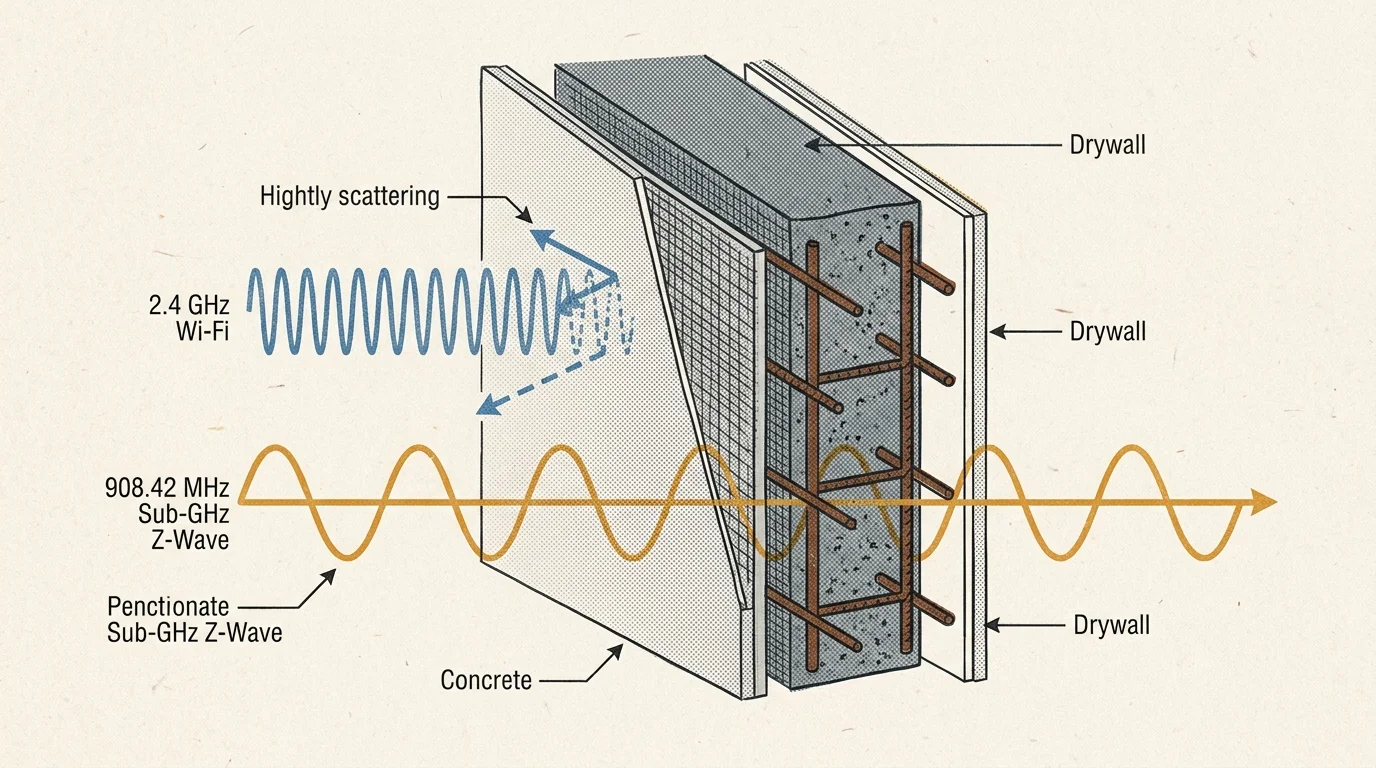
The smartest architecture choice for a z-wave high rise condo setup is shifting your devices below 1 GHz. In North America, standard Z-Wave operates strictly on 908.42 MHz and 916 MHz.
When planning your fixtures, comparing Zigbee vs Z-Wave vs Wi-Fi for smart bulbs helps identify which hardware handles wall materials best.
Because no consumer Wi-Fi router broadcasts near 900 MHz, your automation commands travel through completely silent spectrum. Packet collisions drop to absolute zero.
The best smart home is the one you don’t have to manage.
Radio physics explains why Sub-GHz frequencies excel inside concrete high-rise buildings. Signals operating around 900 MHz experience roughly 6 dB to 8 dB less free-space path loss than 2.4 GHz waves.
Lower frequencies feature longer wavelengths that bend around obstacles and penetrate reinforced concrete walls easily. Your hub can control a lock on the far side of your unit without signal degradation.
Modern Z-Wave hardware leverages the 800-series chip architecture. This standard delivers two distinct deployment topologies depending on your hardware selection:
- Classic Z-Wave Mesh: Connects up to 232 devices, relaying messages through mains-powered repeaters at −1 dBm to +5 dBm power.
- Z-Wave Long Range: Expands network capacity up to 4,000 devices using a star topology directly to your central hub.
- Dynamic Power Control: Adjusts RF power up to +30 dBm (1 Watt) to pierce through the thickest structural columns.
- Battery Conservation: Low-power listening modes allow door sensors to run for over five years on single coin cells.
Z-Wave locks your smart traffic into a dedicated, locally processed highway. Your automations run instantly even if your residential broadband goes offline.
If you live in a multi-story loft with thick concrete floors, Sub-GHz frequencies solve connectivity drops permanently. You avoid the RF congestion that renders Wi-Fi sensors unusable.

Thread and Matter 1.4: Channel Isolation and Resilient Mesh
If you prefer using newer low-power mesh hardware, Thread provides an exceptional alternative to Wi-Fi. Thread relies on the IEEE 802.15.4 wireless protocol, spanning 16 channels numbered 11 through 26.
To dive deeper into the standard’s multi-admin capabilities, explore our complete guide to mastering Matter smart home compatibility.
While Thread shares the 2.4 GHz band with Wi-Fi, it avoids interference through narrow channel footprints. Thread channels measure only 2 MHz wide, compared to 20 MHz or 40 MHz for standard Wi-Fi channels.
According to the official Matter Smart Home Standard specifications, Thread creates a self-healing mesh network without relying on vendor-locked bridges. Every mains-powered Thread device acts as a router node.
You can isolate your Thread mesh from apartment Wi-Fi noise by pinning your network to Thread Channel 26. Wi-Fi channels 1, 6, and 11 completely miss Channel 26, leaving it entirely interference-free.
Recent protocol advancements have solved earlier integration hurdles across different smart home brands:
- Thread 1.4 Specification: Released in September 2024, it standardizes credential sharing between Apple, Google, and Home Assistant border routers.
- Infrastructure Backhauls: Thread 1.4 allows border routers to pass mesh traffic across wired Ethernet and 5 GHz Wi-Fi.
- Matter 1.4 Specification: Rolled out in November 2024, introducing Home Routers and Access Points certification.
- Long Idle Time: Matter 1.4 enables battery-powered sensors to sleep for up to 18 hours without dropping off the network.
Thread routers dynamically reroute data packets if an intermediate device loses power. If someone unplugs a smart plug in the hallway, your sensors find another path instantly.
This mesh resilience prevents automation failures when managing dense configurations in shared buildings. You gain rock-solid reliability without routing smart home commands through third-party cloud servers.
Protocol Comparison: Wi-Fi vs. Z-Wave 800 vs. Thread
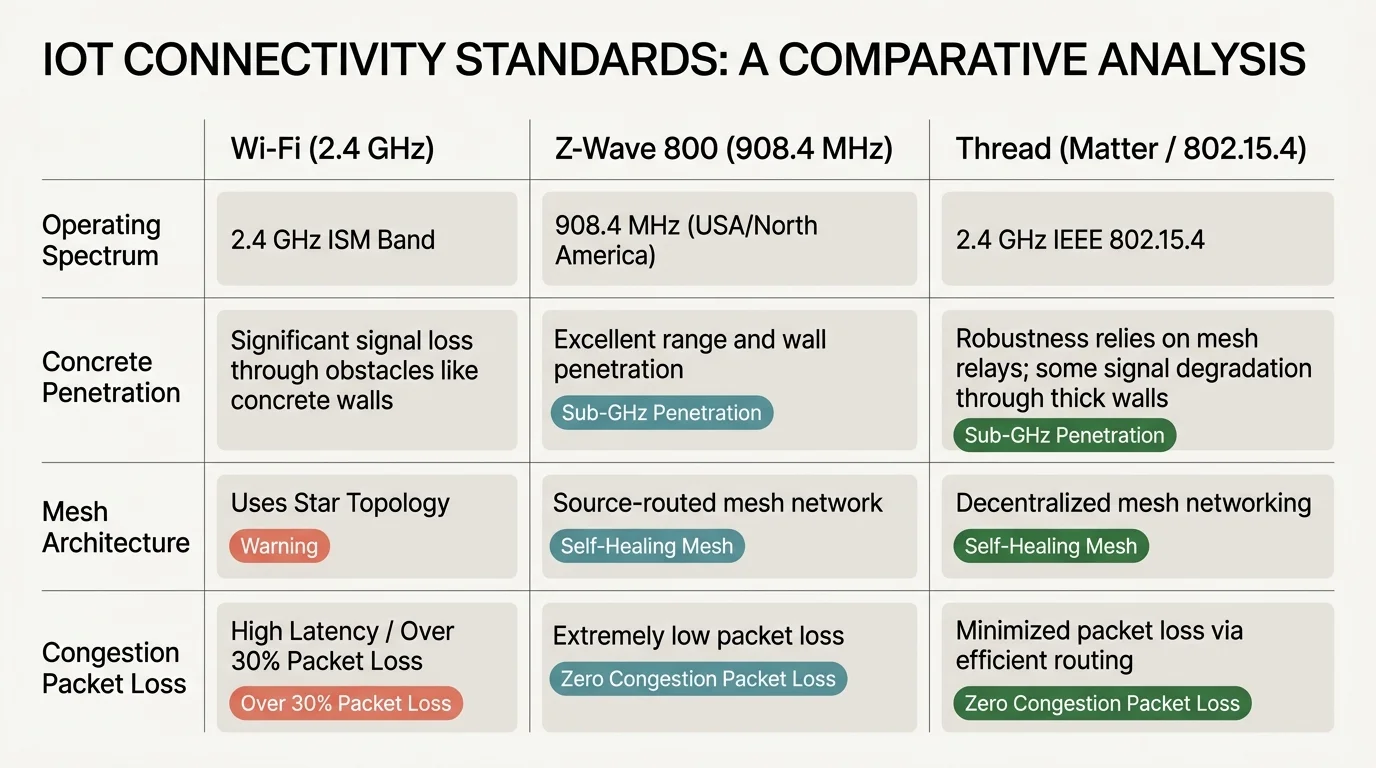
Selecting the right wireless protocol depends on your condo layout, wall construction, and device count. The measurable attributes below highlight how these standards perform under intense apartment interference.
For a broader foundation across radios and network layers, read our overview of smart home protocols including Wi-Fi, Zigbee, Z-Wave, and Matter.
| Metric / Attribute | 2.4 GHz Commodity Wi-Fi | Z-Wave 800 Series | Matter-over-Thread |
|---|---|---|---|
| Operating Frequency | 2.412 GHz – 2.462 GHz | 908.42 MHz / 916 MHz (US) | 2.405 GHz – 2.480 GHz |
| Interference Immunity | Poor (saturates under 40+ SSIDs) | Immune (no Wi-Fi overlap) | High (on Channel 26) |
| Max Devices (Single Hub) | 32–64 per home router band | 232 (Mesh) / 4,000 (ZWLR) | 250+ per Thread mesh |
| Free-Space Path Loss | High baseline loss | 6 dB to 8 dB lower loss | High baseline loss |
| Wall Penetration (Concrete) | Severely attenuated (12-18 dB drop) | High penetration (3-5 dB drop) | Moderate attenuation (10-15 dB drop) |
| Typical Mesh Latency | 150 ms – 5,000+ ms (jitter) | 15 ms – 40 ms | 20 ms – 50 ms |
Standard Wi-Fi fails under high device counts because each gadget negotiates individual DHCP leases and broadcast traffic. Z-Wave and Thread isolate smart devices from your local router’s CPU entirely.
By moving sensors and switches to Z-Wave or Thread, your router preserves precious processing power for your laptops and streaming televisions.
Worked Migration Example: Upgrading a 950-Square-Foot Condo
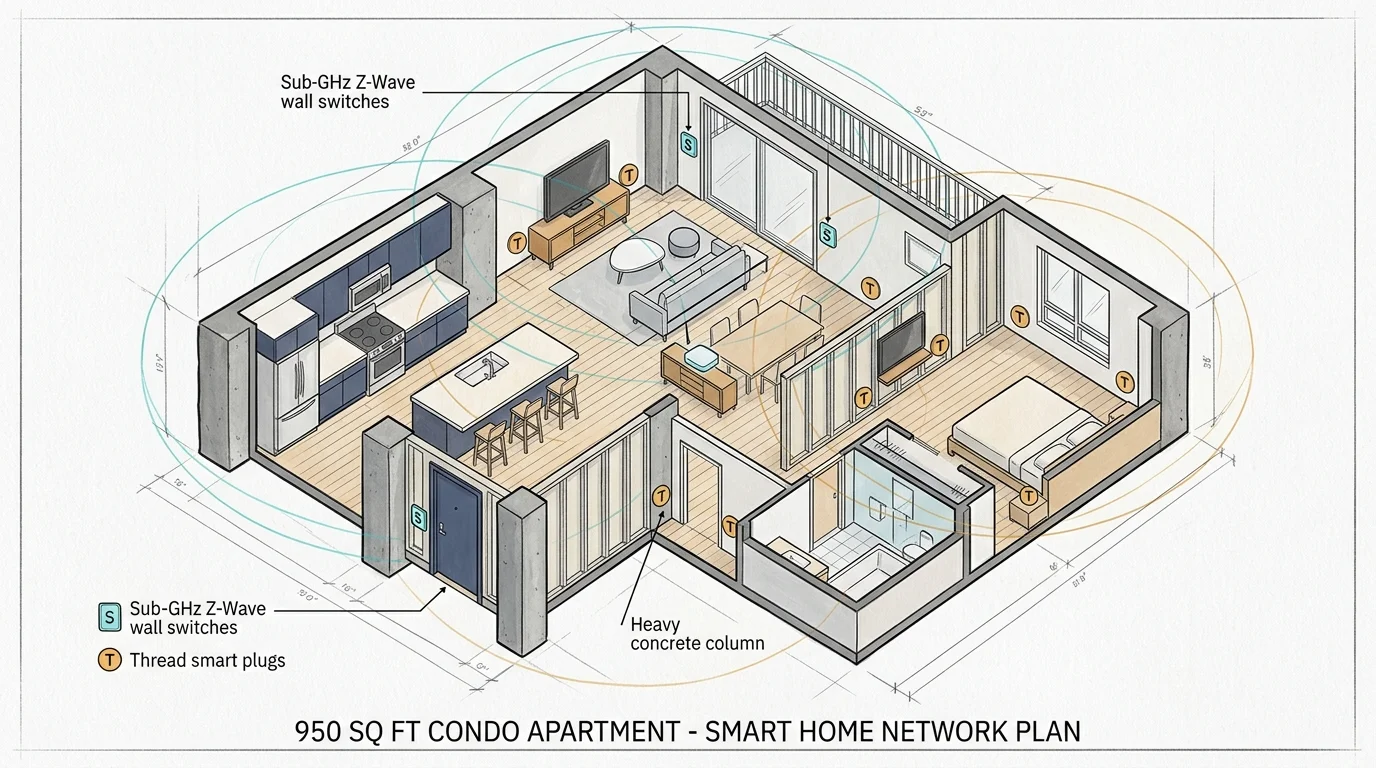
Consider a practical migration scenario inside a 950-square-foot, two-bedroom high-rise condominium in downtown Chicago. The resident faced constant device timeouts caused by 46 overlapping neighbor Wi-Fi networks.
If you rent your unit and cannot swap out hardwired wall dimmers, check out smart home devices for renters that you can take with you when moving.
The original configuration relied on 28 commodity 2.4 GHz Wi-Fi devices. The setup included 14 smart plugs, 8 smart bulbs, 4 contact sensors, a thermostat, and a smart deadbolt.
A 48-hour packet capture revealed a 34% packet drop rate across the 2.4 GHz band. Light switch commands suffered latency delays between 4 and 12 seconds, while window sensors frequently went offline.
The owner replaced the failing setup with a clean hybrid configuration using Sub-GHz Z-Wave and Matter-over-Thread. Here is the exact bill of materials and investment breakdown:
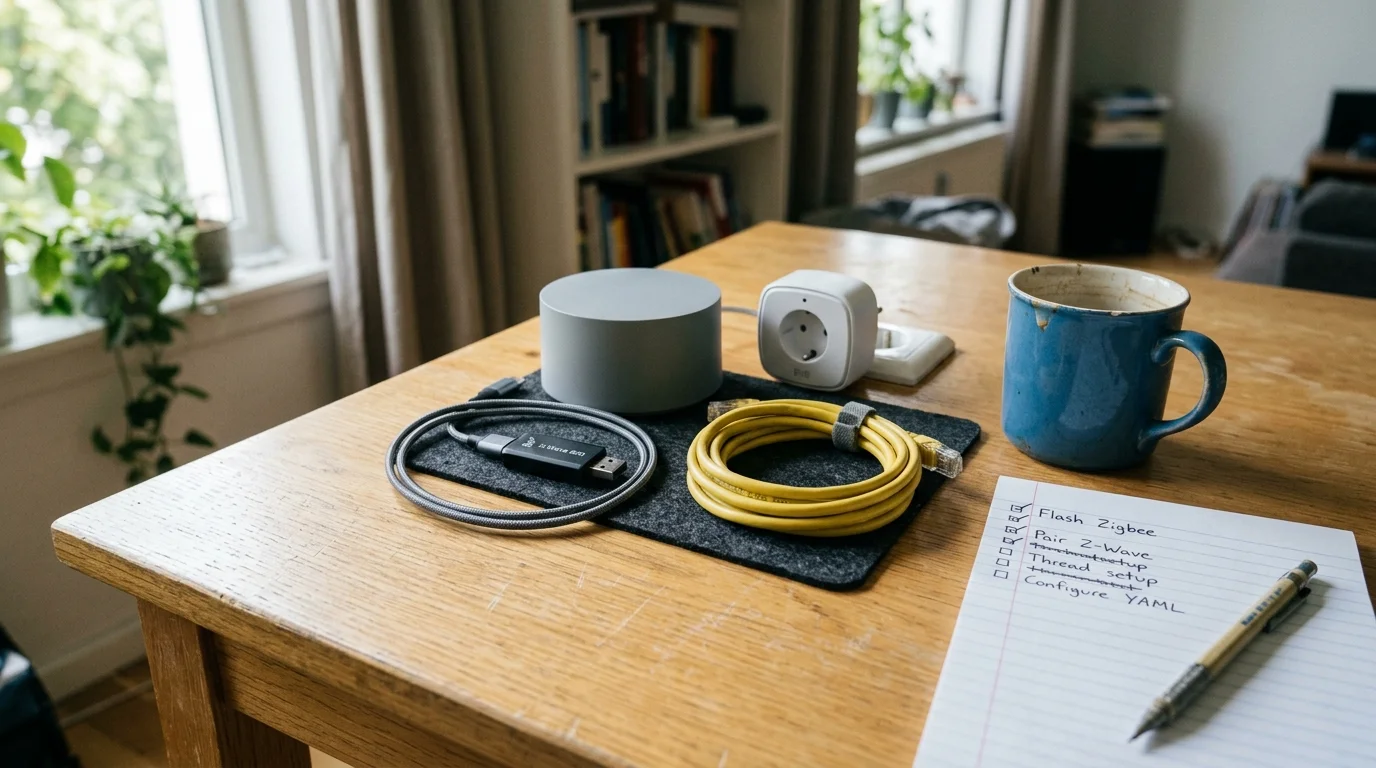
- Home Assistant Green Hub: $99.00 (central processing coordinator).
- Zooz 800 Series Z-Stick (ZST39): $35.00 (plugs into USB port of hub).
- Apple HomePod Mini: $99.00 (serves as the Thread Border Router).
- Six Zooz ZEN72 800-Series Wall Dimmers: $168.00 ($28.00 each).
- Six Zooz ZEN04 Z-Wave Smart Plugs: $132.00 ($22.00 each).
- Four Eve Door & Window Sensors (Matter-over-Thread): $160.00 ($40.00 each).
The hardware transition required a total investment of $693.00. The resident completed the entire physical installation and pairing process across 180 minutes on a Saturday afternoon.
During configuration, the owner configured the Thread network to broadcast exclusively on Thread Channel 26. The Z-Wave controller operated natively on 908.42 MHz.
The technical results proved decisive. Post-migration network analysis confirmed packet loss dropped from 34% down to 0.1% across sixty continuous days of logging.
Average switch command execution latency plummeted from 4,800 milliseconds down to 38 milliseconds. Device dropouts and “not responding” errors vanished completely.

Step-by-Step Transition Plan: Building an Interference-Free Setup
Migrating your apartment requires a systematic approach to prevent disruptions to your daily routines. Follow these actionable steps to transition your living space smoothly.
- Audit your local RF environment: Download a free Wi-Fi analyzer tool onto your phone or laptop. Count how many neighboring SSIDs crowd 2.4 GHz channels 1, 6, and 11.
- Migrate high-bandwidth hardware to 5 GHz and 6 GHz: Shift all laptops, smartphones, and media streaming boxes off 2.4 GHz. Reserve your primary Wi-Fi bands exclusively for high-throughput traffic.
- Establish your controller base: Connect a dedicated multi-protocol hub like Home Assistant Green or a SmartThings Station to your router using a physical Ethernet cable. Avoid running your hub over Wi-Fi.
- Deploy your Thread Border Router: Place an Apple HomePod Mini, Amazon Echo (4th Gen), or Google Nest Hub centrally within your apartment. Ensure it runs the latest firmware supporting Thread 1.4.
- Set your Thread Channel manually: If your hub software permits channel selection, set Thread operation to Channel 26. This isolates your Thread mesh completely from neighboring Wi-Fi transmissions.
- Swap critical control points to Z-Wave: Replace flaky Wi-Fi light switches and wall plugs with Z-Wave 800 devices. Begin pairing devices closest to the hub before moving outward.
- Decommission old Wi-Fi peripherals: Unpair and factory reset legacy 2.4 GHz plugs and bulbs. Removing them clears airtime slots for the few remaining devices that must use Wi-Fi.
Take extra care when installing in-wall switches. Turn off the breaker at your electrical panel and verify the circuit is dead with a non-contact voltage tester before touching wiring.
If you encounter aluminum branch wiring or lack a neutral wire in your switch box, stop immediately and hire a licensed electrician.
Hardware Recommendations for Congested Apartment Living
Selecting reliable equipment prevents configuration headaches when retrofitting high-density homes. Focus on hardware with proven RF isolation and strong local control capabilities.
Evaluated testing trends highlighted by PCMag Smart Home show that dedicated mesh coordinators dramatically reduce local latency. USB dongles based on the Silicon Labs 800-series platform offer exceptional stability.
The Zooz 800 Series Z-Stick (ZST39) retails for approximately $35 and provides complete Sub-GHz control for local platforms like Home Assistant. Alternatively, the Aeotec Z-Stick 7 offers solid performance for around $38.
For smart switches and dimmers, Zooz ZEN71 on/off switches and ZEN72 dimmers offer compact shells that fit easily into shallow apartment junction boxes. They support Z-Wave Long Range for maximum penetration through concrete party walls.
If you want easy Matter-over-Thread accessories, look to Eve Systems. The Eve Energy smart plug ($39.95) functions as an always-on Thread repeater node that reinforces your apartment’s internal mesh.
Pairing these plugs with Eve Door & Window sensors creates an ultrafast automation loop. For example, your hallway light turns on instantly when your front door opens, running entirely over local Thread packets.
For renters who cannot change in-wall switches, smart plugs and wireless button remotes solve lighting control without violating lease agreements. Third Reality and Aqara make compact Matter-compatible buttons that mount with removable adhesive strips.
Building around these dedicated protocols ensures that your devices operate independently from external cloud outages or crowded residential airwaves.
Frequently Asked Questions
Why do 2.4 GHz smart devices disconnect so often in apartment buildings?
Apartment buildings crowd dozens of wireless routers into close physical proximity. Because the 2.4 GHz band only has three non-overlapping channels, competing routers continuously jam one another.
Smart devices use low-cost wireless chips that back off when noise is detected. High interference causes repeated packet drops and network timeouts.
Can Thread devices interfere with my apartment’s 5 GHz Wi-Fi?
No, Thread cannot interfere with 5 GHz or 6 GHz Wi-Fi networks. Thread operates exclusively on IEEE 802.15.4 channels within the 2.4 GHz band.
Your 5 GHz Wi-Fi runs on entirely separate frequencies. The two systems transmit simultaneously without causing packet degradation.
What is the difference between Z-Wave mesh and Z-Wave Long Range?
Classic Z-Wave forms a repeating mesh network where signals hop through intermediate powered devices to reach the hub, supporting up to 232 nodes. Z-Wave Long Range uses a star topology where every device communicates directly with the hub.
Z-Wave Long Range supports up to 4,000 nodes and outputs higher transmission power. It easily pierces structural apartment walls without intermediate repeaters.
Why is Thread Channel 26 recommended over Channels 11 through 25?
Most standard Wi-Fi routers operate on Channels 1, 6, and 11, which emit energy that spills into Thread channels 11 through 24. Thread Channel 26 sits at the extreme upper edge of the 2.4 GHz ISM band.
Because standard Wi-Fi transmissions roll off before reaching Channel 26, Thread devices operating there experience near-zero Wi-Fi interference.
Disclaimer: This article is for informational purposes only. Smart home devices involve electrical connections and data privacy. Always follow manufacturer instructions for installation. For complex wiring or HVAC work, consult a licensed professional.

1 Comment