Rotating weekly through morning, evening, and graveyard factory shifts completely breaks standard smart home schedules. By parsing dynamic calendar event tags through webhooks, you can automatically shift your entire home routine by exactly 8 or 16 hours without editing a single setting.
Most automation guides force you into building fragile duplicate schedules or toggling vacation profiles before every rotation. This tutorial shows you how to automate routines based on calendar feeds so your home recalibrates itself seamlessly.
Whether you work industrial manufacturing or emergency logistics, dynamic scheduling eliminates manual schedule fatigue entirely.
The Mechanics of the Rotating Factory Shift Smart Home Dilemma
Consumer smart platforms assume that human life repeats on a rigid, seven-day solar cycle. Hubs from Google, Apple, and Amazon expect you to wake at 06:00 and sleep at 22:00 every weekday.
Rigid static timers also disrupt daytime rest when integrating a robot vacuum routine that sweeps while an overnight worker is sleeping.
When an industrial plant rotates your shift every Sunday night, those rigid schedules collapse. An alarm that sounds at 05:30 is catastrophic when you finished a graveyard shift at 07:00 that morning.
Manually adjusting dozens of individual schedules across multiple smart home apps drains your time. Worse, sleep deprivation makes human error inevitable, leading to missed alarms or midday cooling disruptions.
True rotating shift home automation decouples triggers from static clock times. Instead, your home must reference a dynamic external schedule that serves as a single source of truth.
An iCal feed provides that single source of truth. By linking platform routines to published calendar events, your living environment adapts dynamically whenever your plant supervisor updates your work rotation.

Structuring Your iCal Feed: Standardizing Shift Tags and Regex Triggers
Most employer scheduling platforms like Kronos, UKG, or Workday allow you to export schedules via an iCalendar (.ics) subscription link. If your employer provides a static portal, you can mirror those shifts into Google Calendar.
If your plant portal cannot export direct links, using IFTTT for advanced automations provides a straightforward method to relay shifts into your calendar.
To automate reliably, your automation processor must identify shift types instantly. You accomplish this by standardizing your event summaries using bracketed metadata tags.
Avoid ambiguous descriptions like “Work” or “Morning Shift at Assembly Plant 4.” Automation parsers process clean strings much more efficiently than messy human sentences.
Adopt a predictable tagging taxonomy inside your calendar event titles:
- [SHIFT:DAY]: Represents morning operations, typically starting at 07:00.
- [SHIFT:SWING]: Represents afternoon or evening operations, typically starting at 15:00.
- [SHIFT:GRAVE]: Represents overnight operations, typically starting at 23:00.
- [SHIFT:OFF]: Represents scheduled rest and recovery days between rotations.
Your calendar parser uses regular expressions (Regex) to scan incoming event summaries for these bracketed strings. A simple expression like \[SHIFT:(DAY|SWING|GRAVE|OFF)\] isolates your exact rotation instantly.
Configure your smart home engine to scan your calendar feed daily at 18:00. Looking forward 12 to 24 hours provides ample runway to stage nightstand alarms, HVAC modes, and blackout shade positions.
Configuring the Webhook Relay: Home Assistant and Node-RED Calendar Pipelines
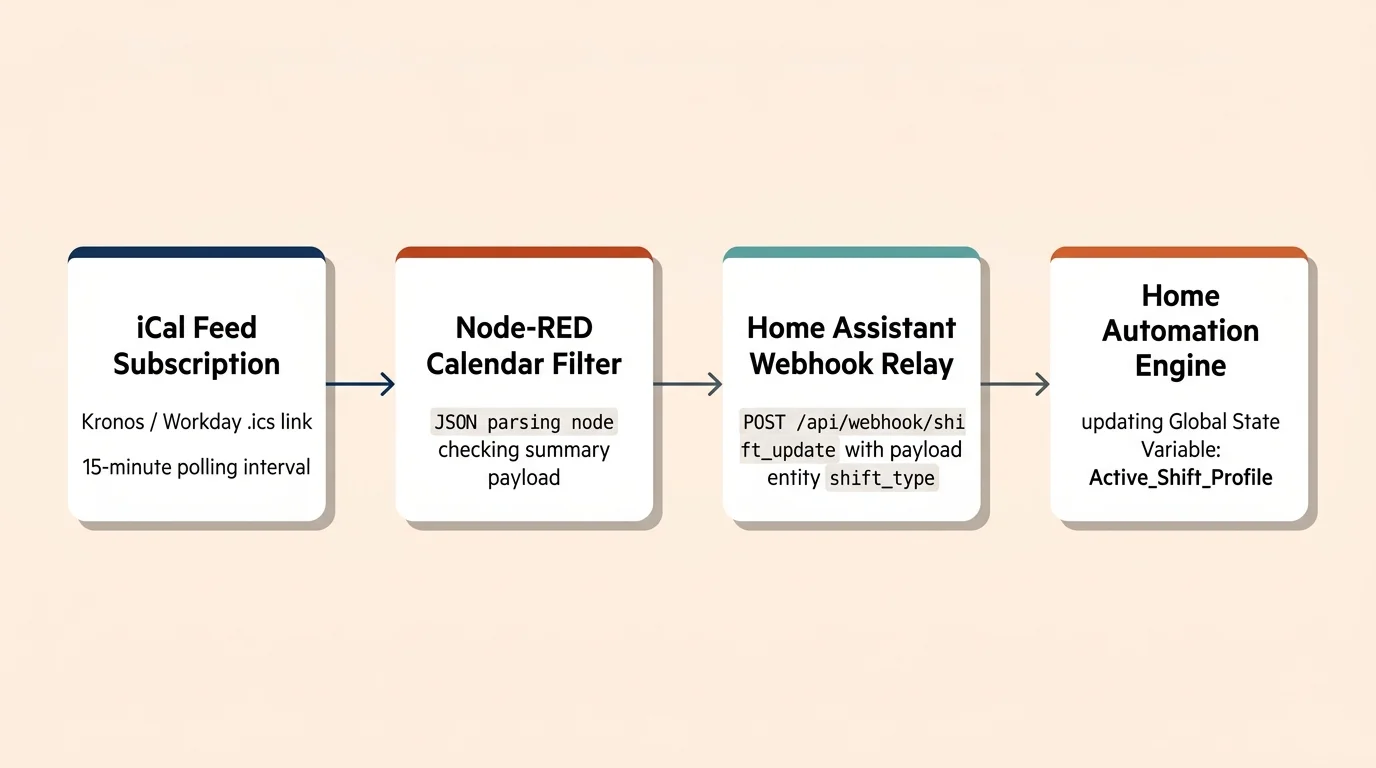
Standard voice assistants cannot natively calculate rolling time offsets from calendar metadata. You need an automation engine like Home Assistant or Node-RED to parse the iCal feed and fire webhooks.
Coupling your calendar states with motion sensor automations ensures that daytime movement inside the house will not trigger blinding overhead lights.
Understanding how to chain multiple automations together helps you pass calendar payloads reliably into downstream household scenes.
Follow these steps to establish an automated calendar-to-webhook pipeline:
- Subscribe your automation hub to the external .ics calendar feed using a native calendar integration.
- Create a state variable or template sensor to hold the active shift mode value: Day, Swing, Grave, or Off.
- Configure an automation rule that triggers whenever an event matching your regex pattern enters the 12-hour evaluation window.
- Extract the event start timestamp and assign it to an automation payload variable.
- Dispatch an HTTP POST webhook containing the parsed shift tag and start timestamp to your local automation router.
The webhook payload delivers clean, structured JSON data directly to your execution engine:
{"shift_type": "GRAVE", "start_epoch": 1729033200, "offset_hours": 16}
Once your automation processor receives this payload, it updates the global shift profile. Every downstream sub-routine reads this single state value to recalculate execution times.
By establishing this webhook relay, you create an event-driven ical shift worker smart home architecture. You touch your smart home app zero times when your shifts rotate.
Calculating Variable Time Offsets: Shifting Base Schedules by 8 and 16 Hours
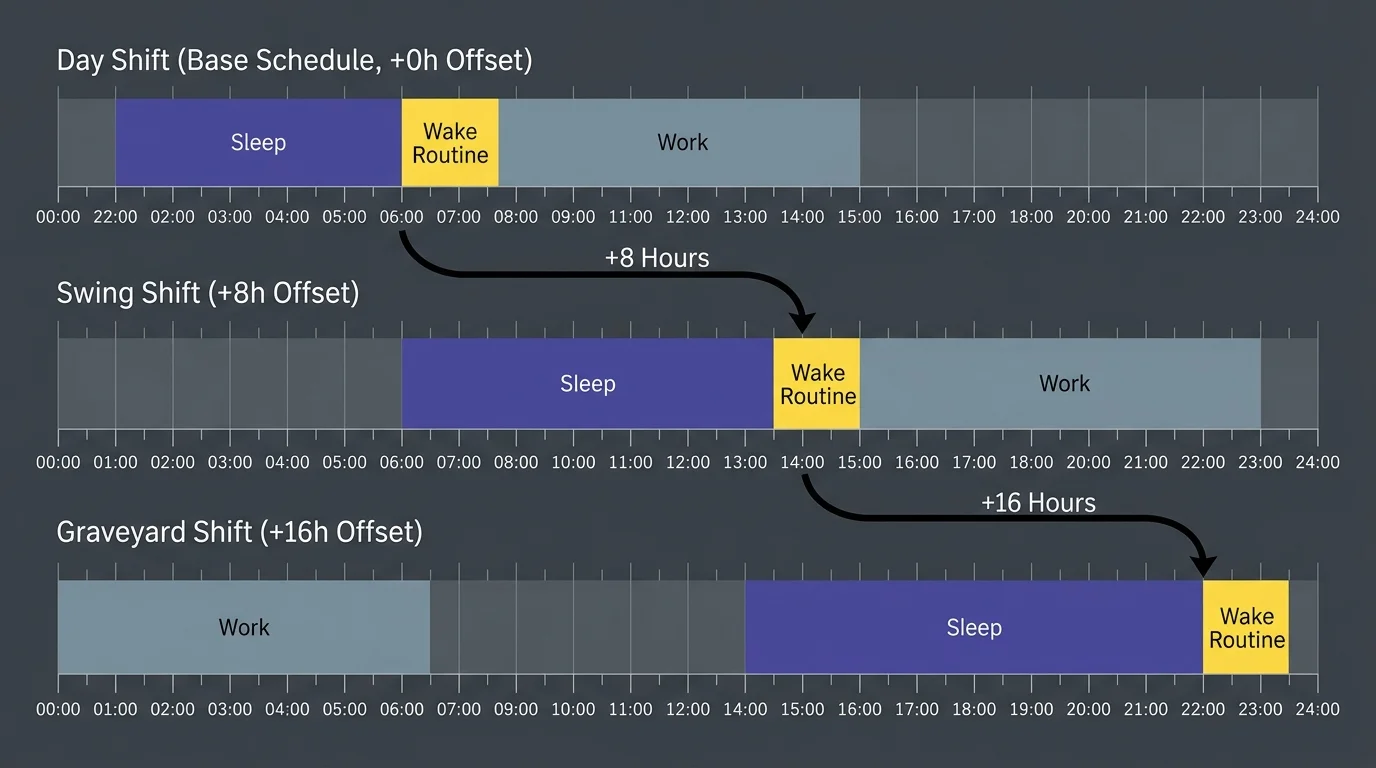
Industrial rotations almost universally pivot on eight-hour increments. A classic three-shift factory system splits the day into 07:00–15:30 (Day), 15:00–23:30 (Swing), and 23:00–07:30 (Graveyard).
For overnight rotations, pairing this time shift with a reversed circadian dawn simulation ensures your bedroom lights ease you awake during evening hours.
Instead of building three separate routines for every device, build one standardized Day Shift baseline routine. You then apply a mathematical offset of plus 8 hours or plus 16 hours to every linked schedule.
If your baseline morning wake routine begins at 05:30, calculate subsequent shift routines using timestamp mathematics:
- Day Shift Base (T+0 hours): Wake sequence fires at 05:30 (07:00 minus 90 minutes).
- Swing Shift Offset (T+8 hours): Wake sequence shifts forward 8 hours to execute at 13:30 (15:00 minus 90 minutes).
- Graveyard Shift Offset (T+16 hours): Wake sequence shifts forward 16 hours to execute at 21:30 (23:00 minus 90 minutes).
Dynamic timers evaluate the incoming shift start timestamp and subtract your custom lead buffers. If you need 45 minutes for breakfast and 45 minutes for commuting, your offset subtracts 90 minutes from shift start.
This dynamic calculation applies equally to reverse sequences. Bedtime routines for graveyard shifts trigger at 08:30 in the morning—exactly 60 minutes after your 07:30 punch-out time.
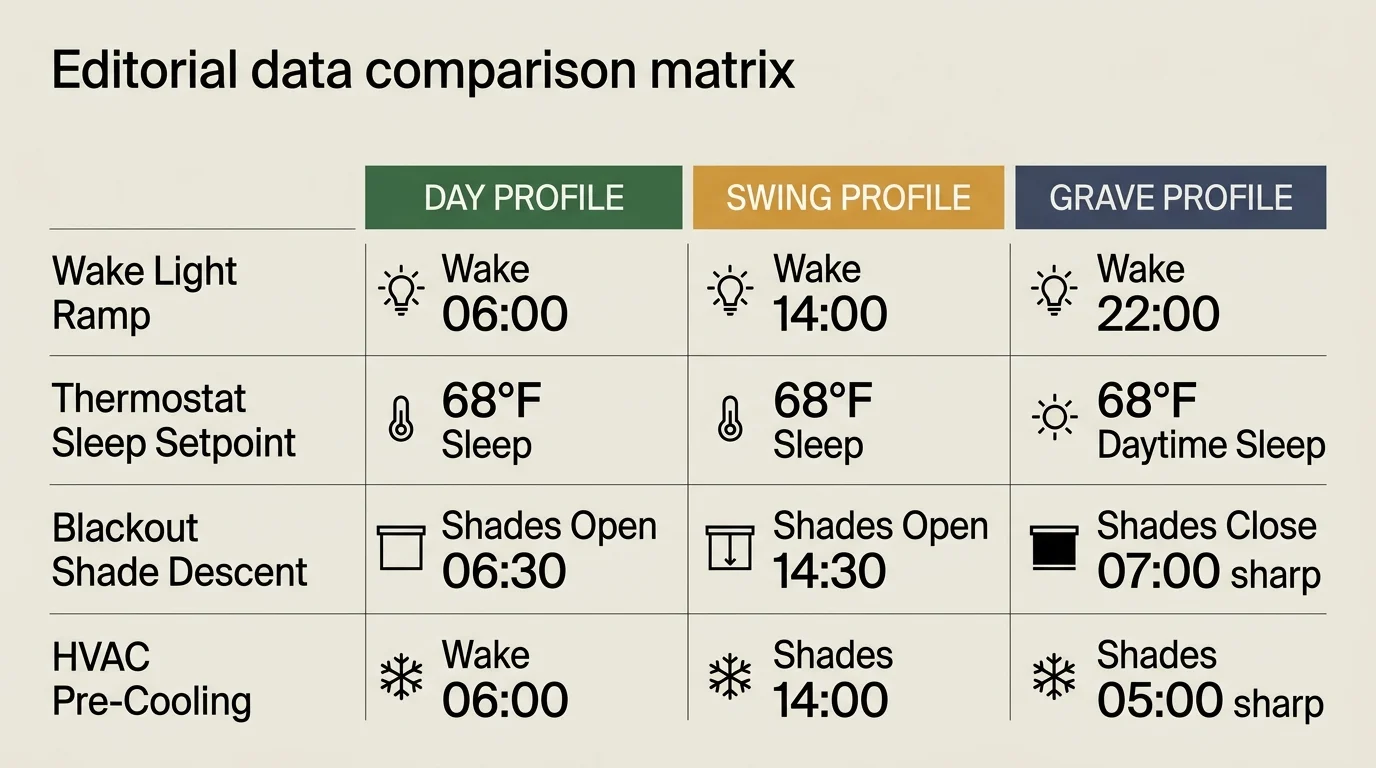
Comparing Shift Profile Automation Parameters
Each rotation requires distinct environmental targets to optimize wakefulness, commute readiness, and daytime sleep quality. The following parameters illustrate how environmental variables adjust dynamically across each eight-hour rotation block.
Achieving these cooler daytime bedroom setpoints during summer graveyard shifts often requires layering weather-based smart automations to pre-cool before solar heat peaks.
| Shift Profile | Event Tag | Wake Buffer | HVAC Sleep Setpoint | Bedtime Lux Target | Wake Lighting Color Temp |
|---|---|---|---|---|---|
| Day Shift | [SHIFT:DAY] | -90 min (05:30) | 68°F (Night) | 0 Lux (Natural Dark) | 5000K (Daylight Cool) |
| Swing Shift | [SHIFT:SWING] | -90 min (13:30) | 67°F (Late Night) | 0 Lux (Natural Dark) | 4000K (Neutral White) |
| Graveyard Shift | [SHIFT:GRAVE] | -90 min (21:30) | 65°F (Daytime Cold) | 0 Lux (Blackout Shades) | 6000K (High Alert Blue) |
| Recovery Rest | [SHIFT:OFF] | None (Manual) | 68°F (Standard) | Ambient Dawn Sunlight | 2700K (Warm Relaxed) |
Notice the deliberate variance in HVAC setpoints. Daytime sleep during graveyard rotations demands a colder ambient bedroom temperature to counteract ambient thermal loads and circadian disruptions.
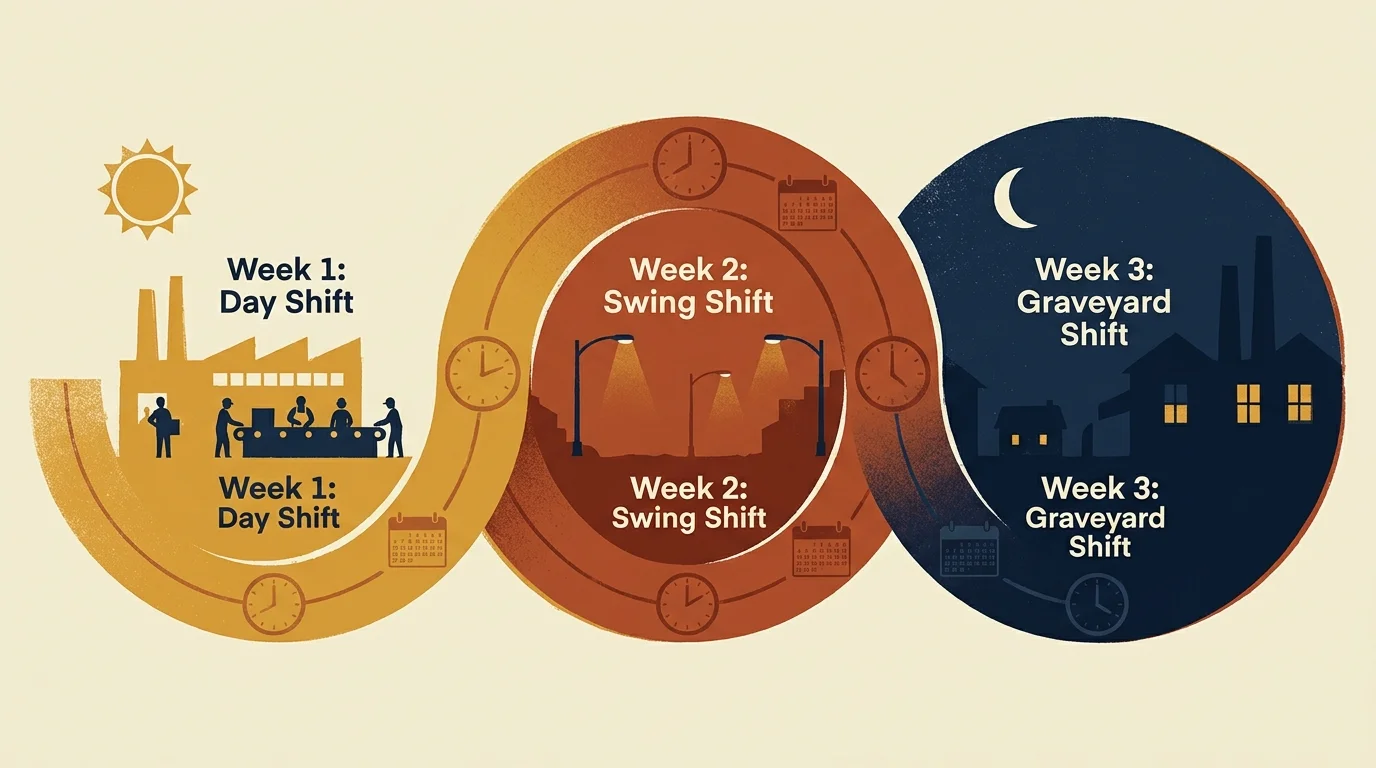
Worked Example: A Three-Week Industrial Shift Cycle Automation in Action
To see how dynamic offsets execute in real life, consider an assembly technician named Marcus working a three-week plant cycle. Marcus uses Home Assistant connected to an automated calendar feed and several smart devices.
Marcus maintains one master template schedule tied to his Day Shift baseline. His home contains an Ecobee thermostat, Zigbee bedroom shades, Lutron Caseta dimmers, and a smart speaker array.
During Week 1, the calendar contains [SHIFT:DAY] starting Monday at 07:00. At 18:00 Sunday, the parser detects the tag and sets the system offset variable to zero hours.
At 05:30 Monday morning, the Day sequence begins. Lutron dimmers fade up to 40% at 2700K over 15 minutes, the thermostat shifts to 70°F, and the coffee maker receptacle powers on.
During Week 2, Marcus rotates to Swing shift. The iCal feed populates with [SHIFT:SWING] starting Monday at 15:00, prompting the webhook relay to update the global offset variable to plus 8 hours.
Without Marcus modifying a single automation, his morning wake sequence moves completely. The coffee pot remains off at 05:30; instead, the wake sequence executes smoothly at 13:30.
During Week 3, Marcus takes on the Graveyard rotation with a calendar entry of [SHIFT:GRAVE] starting Monday at 23:00. The webhook shifts the base timeline by 16 hours, making his wake alarm trigger at 21:30.
The true power reveals itself when Marcus returns home Tuesday at 08:00. The house detects his geofence return while in Graveyard mode and initiates daytime sleep protocol.
Motorized blackout shades drop completely, smart doorbells enter Do Not Disturb, and the thermostat drops room temperature to 65°F. Marcus sleeps in dark, cold silence despite noon daylight outside.
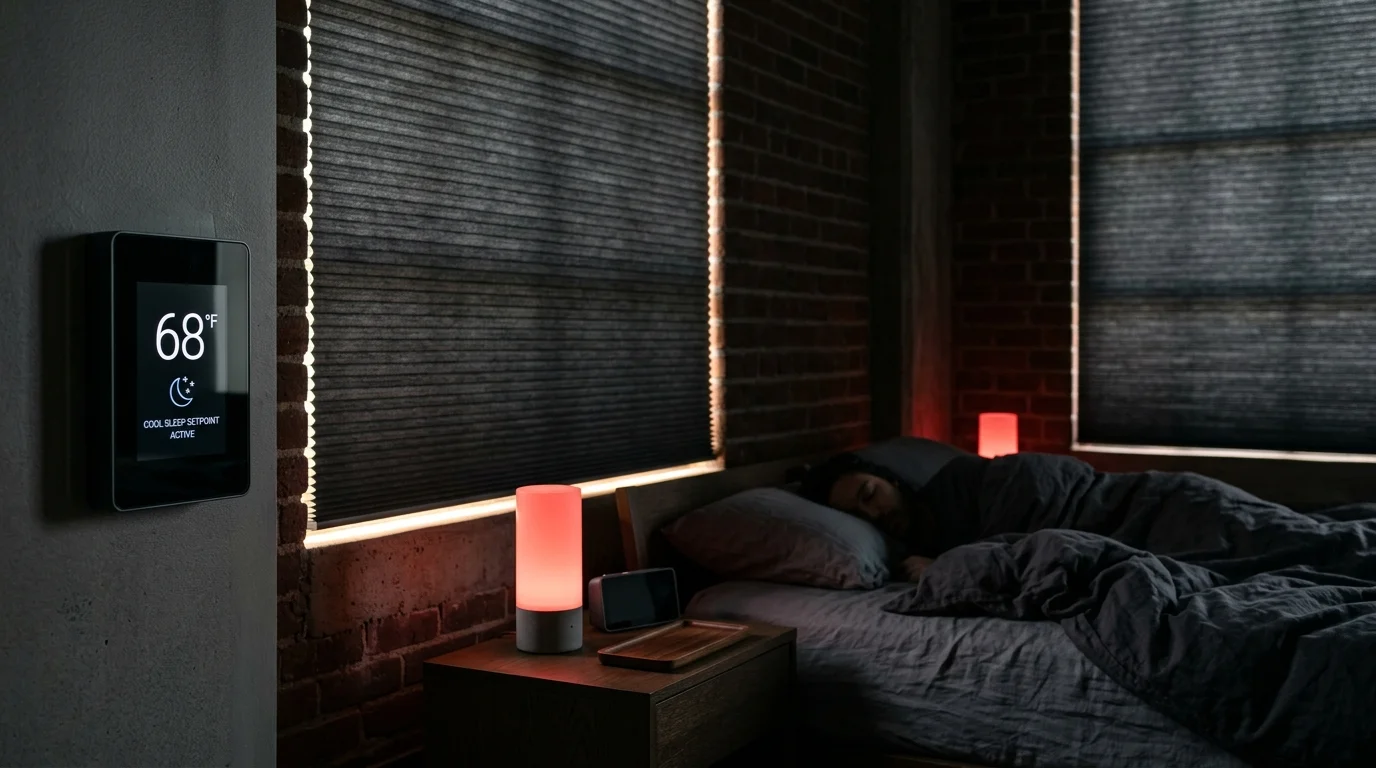
Hardware Execution: Lighting, Motorized Shades, and Thermostat Strategies
Software logic means nothing if your connected hardware fails to execute reliably. Shifting physical environments across non-traditional schedules requires deliberate device selection and protocol planning.
In addition to motorized blinds, integrating red-spectrum nightlights for shift workers ensures safe navigation through the house without breaking daytime melatonin production.
Window coverings require physical motorized opacity. A standard sheer blind will wake a graveyard worker by 09:00 due to natural solar luminance.
Install heavy blackout cellular shades with side channels to eliminate ambient light bleed. Devices adopting the Matter smart home standard ensure that position commands execute locally across your network without cloud delays.
Lighting automation requires tunable white bulbs capable of moving between 2200K and 6500K color temperatures. Blue-enriched 6000K light at 21:30 suppresses melatonin production, ensuring alertness before an overnight shift begins.
Conversely, returning home from an overnight shift requires strict light avoidance. Program garage and entryway lighting to limit brightness to 10% warm amber (2200K) when you arrive home after sunrise.
Climate control represents your most significant operational cost and sleep quality factor. According to guidance on Energy Star certified smart thermostats, programmatic thermal scheduling substantially lowers home energy bills.
Cooling a bedroom to 65°F during a 95°F summer afternoon consumes substantial power. Pre-cool the bedroom starting at 06:30 while morning ambient outdoor temperatures remain cool, minimizing compressor strain.
Isolate your sleeping quarters using automated zone dampers or ductless mini-split units. Never waste energy chilling an unoccupied living room or kitchen to 65°F at midday while you sleep.
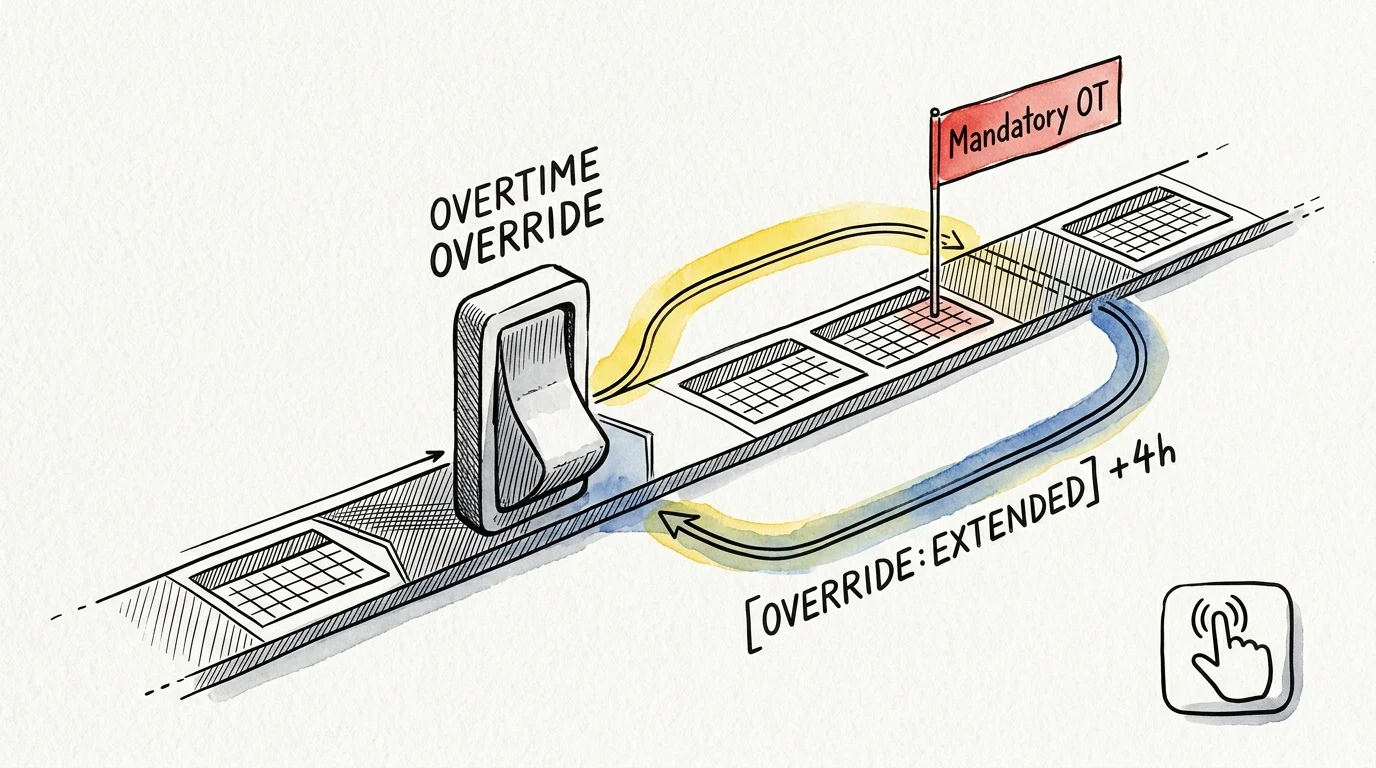
Managing Edge Cases: Mandatory Overtime, Quick Turnarounds, and Sick Days
Industrial schedules rarely proceed without interruption. Shift workers routinely face mandatory overtime, emergency call-ins, and abbreviated turnarounds that can throw automated schedules into chaos.
To handle overtime without breaking your baseline rules, establish sub-tags within your calendar taxonomy. Use tags like [SHIFT:DAY+OT4] or [SHIFT:SWING-EARLY] to indicate extended hours.
Your regex engine captures the supplemental string and adjusts the corresponding offset buffer:
- Early Inbound Buffer: Subtracts an additional 120 minutes from the wake-up routine when overtime precedes the standard shift.
- Late Outbound Buffer: Delays bedtime, cooling, and blackout blind routines when post-shift overtime extends plant departure.
- Quick Turnaround Exception: Prevents full eight-hour sleep routines if intervals between scheduled calendar events drop below 10 hours.
Always maintain a physical failsafe override at your bedside. If you fall ill or take unscheduled time off, your smart home should not wake you with blast lighting at 21:30.
Mount a dedicated battery-powered Zigbee button or smart switch directly to your nightstand. A single press should freeze all upcoming calendar triggers and engage a universal “Sick / Extended Rest” profile.
Equally critical is a cloud fallback routine. If your plant’s calendar server goes offline or internet access drops, your local automation hub must revert safely to the last verified active schedule.
Frequently Asked Questions
Can I use this calendar-driven system with Apple Home or Alexa alone?
Native consumer ecosystems like Apple Home or Amazon Alexa lack the regex string-parsing and mathematical offset capabilities required for dynamic shifts. You need a middleware bridge like Home Assistant, Homebridge, or Node-RED to parse the iCal feed and pass actionable webhook triggers into your consumer apps.
What happens if my plant updates the calendar feed while I am already asleep?
Configure your calendar poller to restrict timeline updates when your home is in an active “Sleep” state. If an update occurs while you sleep, your automation hub queues the changes and applies the newly shifted profile only after your current wake routine completes.
How does dynamic shift automation handle daylight saving time changes?
Because iCal feeds store event times using standardized UTC timestamps, epoch time calculations natively adjust for daylight saving transitions. Ensure that your automation hub and phone calendar use the same regional IANA timezone database to prevent one-hour scheduling errors.
Will running air conditioning during the day for graveyard sleep cause massive utility bills?
Daytime cooling costs more due to ambient heat, but smart zoning prevents runaway expenses. Use a smart thermostat to cool only the closed bedroom zone to 65°F while letting main living spaces drift to 78°F, keeping overall power consumption manageable.
Disclaimer: This article is for informational purposes only. Smart home devices involve electrical connections and data privacy. Always follow manufacturer instructions for installation. For complex wiring or HVAC work, consult a licensed professional.